

Industry guide
Start with the account record before scaling leads.
Google's current United States eligibility list includes real estate services. Professional verticals may have profile and onboarding requirements that differ from home-service categories, including practitioner details and headshots in Google's current pre-badge guidance.
Keep the advertised professional, brokerage or agency details, license information, service territory, and profile identity consistent. Confirm current requirements in each market when a team adds agents, opens an office, or changes the entity shown to consumers.
Trust path
Google Verified
Confirm the public verification route before scaling the account.
Customer path
Buyer and seller inquiries
Review how new inquiries move from search result to response.
Account context
Profile, calls, reviews
Keep service area, responsiveness, and lead quality connected.
Next move
Review before edits
Avoid changing budget, categories, or routing from one weak signal.
Google Verified Local Services Ads for Realtors
Insights from Scaling and Managing 10+ Real Estate Agencies
Did you know 80% of local searches convert into clients?
It's time to boost your local marketing. With Google Local Services Ads for realtors, you can attract high-quality leads without exceeding your budget.
Discover how Google Local Services Ads can deliver results for your real estate agency.
Ready to expand your local reach? Contact us online or call (725) 567-5861 to discuss our Google Local Services Ad management plans. Let PrimeLSA help your real estate agency complete the Google Verified path and become the top choice in your area.
How Local Services Ads work for Realtors
Local Services Ads can place realtors in prominent Google Search results and let clients call or message the business from its profile. Google says advertisers pay for leads related to the business and its listed services, rather than for an ordinary visit to the profile.
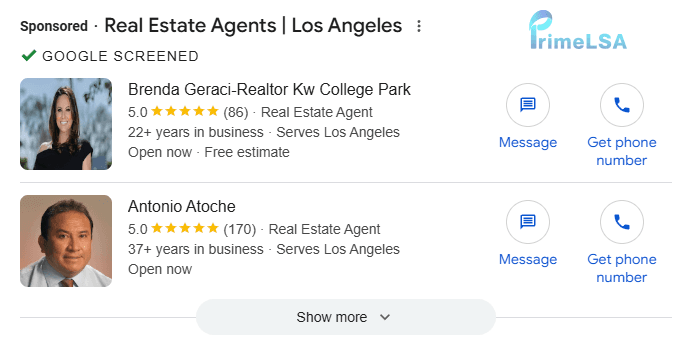
A real estate agency profile can show services, location coverage, reviews, business details, and available contact methods. Searchers may also filter providers by the specific real estate services they need.
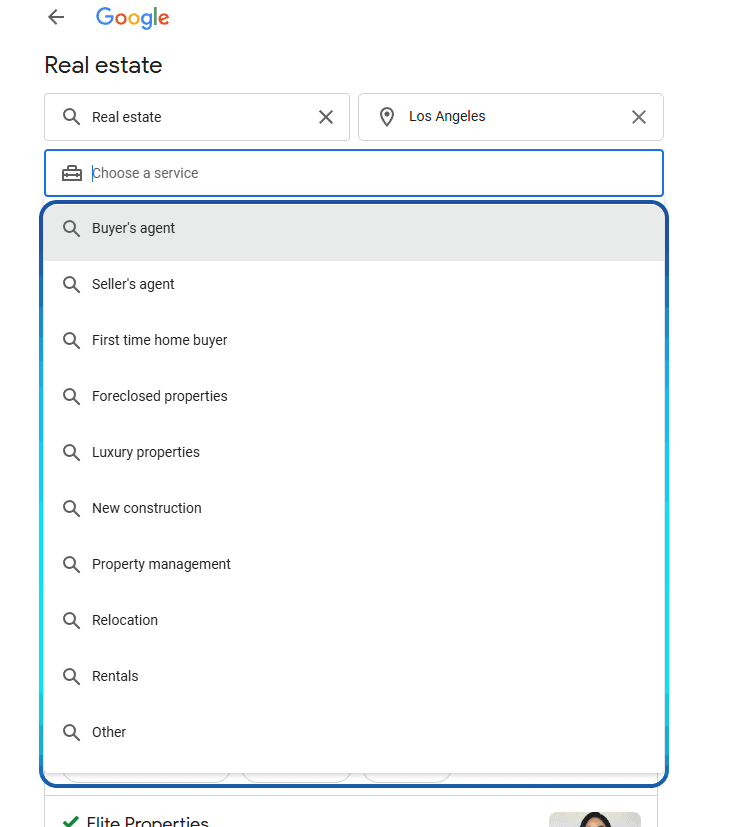
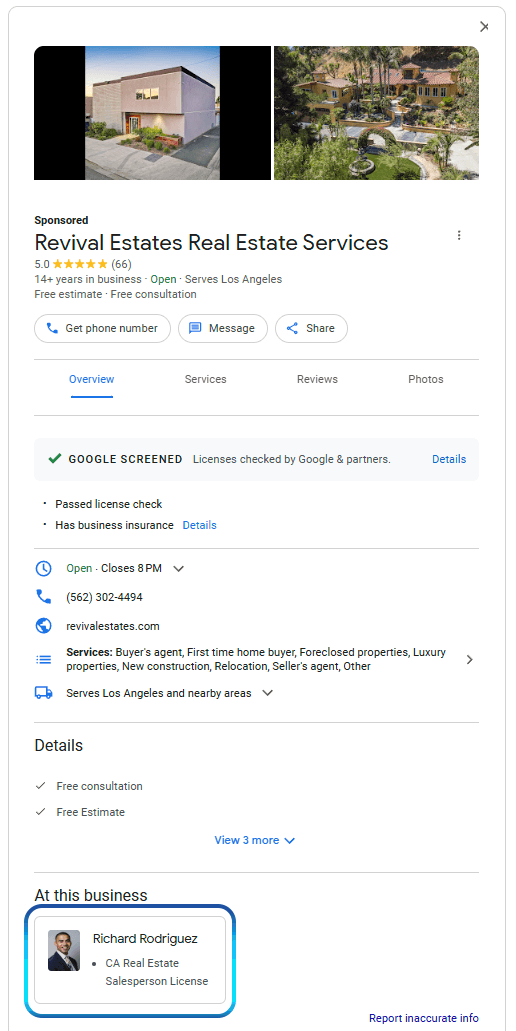
This makes the profile and intake workflow part of the sale. Visibility has limited value when the person answering cannot confirm service fit, timing, or the next step.
Google Verified, formerly Google Screened
Google now uses one Google Verified badge for eligible Local Services Ads advertisers that complete the required screening and verification process. Google announced the transition in August 2025 and began replacing Google Guaranteed, Google Screened, License Verified by Google, and the Money Back Guarantee in October 2025.
For this category, Google Screened is the former name many owners, searchers, screenshots, and older guides still use. The established page and terminology remain useful historical context, but Google Verified is the current badge.
Google's current Google Verified documentation says eligible existing advertisers transition automatically and the badge-name change does not affect Local Services Ads ranking.
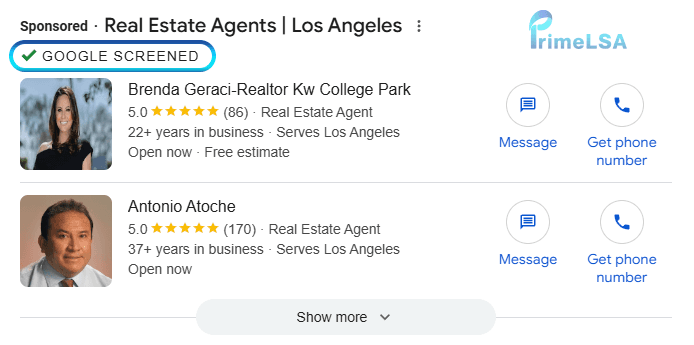
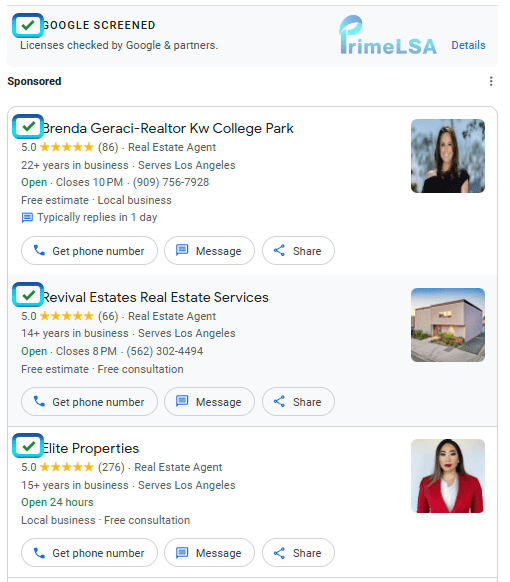
These screenshots show the former Google Screened badge. They are retained so teams can recognize older account views and search language; current eligible profiles use Google Verified.
Google also discontinued the Money Back Guarantee. Its current documentation limits reimbursement requests to eligible services booked through Local Services Ads before December 7, 2025, subject to the stated submission deadline.
The badge is evidence that the listed verification checks were completed. It is not proof of rank, lead quality, response quality, or business performance.
For the historical term and its earlier requirements, see the Google Screened guide.
A Realtor routing map for buyers, sellers, territory, and readiness
A real estate LSA inquiry needs an early buyer-or-seller decision because the next questions and agent assignment differ. For buyers, record the target area, property type, timing, price range, financing stage, and current representation. For sellers, record the property address, ownership, timing, reason for moving, condition, price expectation, and current listing status.
Territory fit is more specific than a city name. An agent may cover one neighborhood, price band, property type, or language need better than another. The routing map should assign a named owner and a response deadline, while keeping rental, commercial, referral, outside-area, and already-represented inquiries in their own lanes.
Readiness changes the follow-up plan. A buyer prepared to tour this week should not share a queue with someone researching a move next year. A seller requesting an immediate listing conversation needs a different cadence from an owner seeking a general valuation. Record the customer's stated timing and next agreed action. Labels such as hot or cold erase those details.
- Intent lane: buyer, seller, both, referral, rental, commercial, or unsupported request.
- Territory lane: target neighborhood, city, radius, property location, and the team's actual coverage.
- Readiness lane: immediate appointment, near-term plan, research stage, unknown, or already represented.
- Buyer lane: financing stage, price range, property type, tour timing, and representation status.
- Seller lane: ownership, property condition, timeline, valuation need, and listing status.
- Assignment lane: agent, team queue, referral owner, decline path, and next response time.
- Outcome lane: conversation, appointment, attended meeting, representation, active client, or closed file.
- Review lane: compare lost qualified inquiries with territory, assignment speed, appointment handling, and follow-up.
Real estate lead economics unfold across a long client journey
A buyer inquiry, seller consultation, rental request, relocation lead, and property-specific question do not carry the same value or timeline. A call can be qualified without producing a near-term closing, so the useful path is contact, conversation, appointment, representation, active search or listing, contract, and closed side.
Commission opportunity alone is not enough. Market, price band, property type, financing readiness, listing readiness, agent capacity, and the time required for nurture all affect whether the acquisition cost makes sense.
- Separate buyer, seller, renter, landlord, and relocation inquiries.
- Track appointments and signed representation before waiting for a closing.
- Measure nurture time and agent workload by client type.
- Break out acquisition economics by market and price band.
Realtor intake must establish intent, territory, and readiness
The first response should establish whether the person is buying, selling, renting, relocating, or asking about one property. For buyers, useful questions include target area, price range, timing, financing status, and property type. For sellers, confirm the property location, ownership, timing, occupancy, and reason for exploring a sale.
Route the inquiry to an agent who works that territory and client type. A fast generic reply followed by several internal handoffs can lose the conversation even when the ad generated a relevant lead.
- Identify buyer, seller, rental, relocation, or property-specific intent.
- Confirm the city, neighborhood, property type, price range, and timing.
- Route by territory and specialty with a named follow-up owner.
- Track appointment set, appointment held, representation signed, and active client status.
Which Realtor LSA outcomes separate interest from an active client?
Real estate teams should track buyer and seller inquiries on different paths. A buyer may need financing readiness, target areas, property type, and timing reviewed before a showing. A seller may need property location, ownership, motivation, condition, and listing timeline reviewed before an appointment.
An appointment is a middle step. The useful record continues through attendance, representation, active search or listing, offer activity, contract, and closing where the brokerage can connect those outcomes. Keep referral-only, rental, commercial, outside-territory, and unresponsive inquiries separate from accepted residential clients.
- Buyer, seller, referral, rental, commercial, or unsupported inquiry type.
- Target territory, price band, timing, and readiness recorded at intake.
- Appointment offered, scheduled, attended, rescheduled, or missed.
- Representation accepted, declined, referred, or still under follow-up.
- Active client and closing outcome connected to the original inquiry when possible.
A weekly Realtor LSA review should track assignments and appointment outcomes
Review every qualified buyer and seller inquiry that lacks a next action. Confirm the assigned agent, territory, client type, timing, last contact, agreed next step, and representation status. Keep referrals, rentals, commercial requests, outside-area leads, and already-represented prospects in distinct outcome groups.
The weekly pattern should guide the question. Slow first response points to coverage or routing. Fast responses without appointments point to fit, script, or expectation setting. Attended appointments without representation need follow-up review. Active clients and closings belong downstream and should not be inferred from call volume.
- New inquiries without an assigned agent and response deadline.
- Buyer and seller contacts outside the team's territory or property focus.
- Appointments offered, scheduled, attended, rescheduled, and missed.
- Qualified prospects with no documented next conversation or task.
- Representation accepted, declined, referred, or still undecided.
- Territory, service, staffing, or follow-up question supported by the record.
Real estate seasonality changes by market and client type
Spring and summer may bring more activity in many markets, but school calendars, interest-rate changes, local inventory, tourism, weather, and relocation cycles can alter the pattern. Seller and buyer demand may also peak at different times.
Review agent availability alongside inquiry volume. Nights and weekends may produce high-intent conversations when showings occur, while holidays or low inventory can extend the nurture period without making the original inquiry worthless.
- Annotate inventory shifts, major rate changes, holidays, and local moving cycles.
- Compare buyer and seller inquiry patterns separately.
- Plan evening and weekend response ownership before opening more demand.
- Use a longer outcome window for nurtured clients and future movers.
Google Verified for Realtors still depends on professional verification
Google's current United States eligibility list includes real estate services. Professional verticals may have profile and onboarding requirements that differ from home-service categories, including practitioner details and headshots in Google's current pre-badge guidance.
Keep the advertised professional, brokerage or agency details, license information, service territory, and profile identity consistent. Confirm current requirements in each market when a team adds agents, opens an office, or changes the entity shown to consumers.
- Confirm real estate service availability in the target market.
- Keep professional and business verification details current.
- Match each advertised territory to an agent who actively serves it.
- Review onboarding again after material team or brokerage changes.
Example: inquiries arrive, but no appointments are held
Consider a real estate team receiving buyer and seller calls that rarely become appointments. Separate unreachable callers, rental requests, unsupported areas, unqualified price bands, buyers without a clear plan, sellers seeking only a valuation, appointments scheduled, and appointments missed.
The breakdown may point to territory mismatch, slow agent assignment, weak qualification, or an appointment-confirmation gap. Those are different fixes, and none can be diagnosed from impressions alone.
- Planning scenario only; use the team's CRM and appointment records.
- Measure leading milestones while the closing cycle develops.
A Realtor LSA workflow for buyer and seller inquiries
The intake owner first identifies whether the person wants to buy, sell, or request a service the team does not handle. The next questions establish territory, timing, price expectations, financing or ownership details, and the agent best suited to the request.
The team then follows the inquiry through a scheduled conversation, attended appointment, representation decision, and active client work. This keeps LSA lead volume from being confused with signed clients or closings and shows whether the gap sits in targeting, response, assignment, or follow-up.
- Classify: separate buyer, seller, referral, rental, and unsupported demand.
- Qualify: capture location, timing, price range, and readiness without overloading the first contact.
- Assign: route the inquiry to an agent who owns that territory and client type.
- Meet: track scheduled and attended appointments, not calendar entries alone.
- Represent: connect active client work and closings to the lead source where records allow.
How realtors can start with Google Verified Local Services Ads
Confirm current category and market eligibility on Google's Local Services page. Then complete the screening and verification steps Google requests for the real estate agency.
Match the service list and service area to work the business can actually accept. Decide who owns calls, messages, qualification, scheduling, and follow-up before increasing lead volume.
Budget examples from this page's original planning model
- Pay per contact: you pay when potential customers call or message your business, making budget review more tied to real lead flow.
- Estimate leads: if cost per contact is $50, a $1000 budget can support roughly 20 leads.
- Adjust for success: a higher budget, such as $5000, can create more opportunities if the team can handle about 100 contacts.
Treat those figures as a planning example, then compare them with the real estate agency's actual lead charges, booked work, response capacity, and service mix.
Start driving more leads for your real estate agency today
Google Local Services Ads are a powerful way to attract local clients to your real estate agency. This investment can significantly grow your real estate agency and generate new leads through online methods.
If managing Local Services Ads feels overwhelming, PrimeLSA is here to assist. With over a decade of experience, we specialize in optimizing Local Services Ads to meet your specific needs.
Want to learn more about how PrimeLSA can help your real estate agency thrive?
Contact us online or call (725) 567-5861 to speak with a strategist about our Google Local Services packages. Let us help you drive more leads and grow your real estate agency today.
What should realtors review before changing LSA settings?
Before changing budget, service categories, profile details, or response workflows, review the account context that affects whether buyer and seller inquiries become useful opportunities: visibility movement, service-area fit, reviews, lead quality, call handling, replies, and account health.
Which service areas and categories are still accurate?
Are calls, messages, and replies being handled quickly?
Do reviews, profile details, and business information match customer expectations?
Did lead quality, market pressure, or account movement change before the slowdown?