Quick answer
LSA payment setup is billing plus budget plus lead review.
Google Local Services Ads use Google Ads billing. You pay for valid leads, manage payment settings through Google Ads billing, and control spend separately through LSA budget settings.
What this covers
- Billing lives in Google AdsLocal Services Ads use Google Ads billing, payment profiles, and payment methods.
- Budget is separateYour weekly budget and monthly max guide spend. They do not replace the payment method or billing profile.
- Charges need reviewCharged leads, credited leads, current balance, and valid lead quality all affect what the bill means.
What to review before acting
Paying for Google Local Services Ads gets easier once you separate three things: the payment method, the budget, and the lead charges.
Google Ads billing handles the payment setup. Local Services Ads budget settings guide spend. The lead inbox and billing view help you review charged leads, current balance, and credits.
5K client calls generated
PrimeLSA has helped generate thousands of Local Services Ads calls for client accounts.
Transparent account communication
Clear communication and account review help teams understand what changed before they act.
Advantage review path
Readers can move from public education into account-specific review through Advantage.
How Local Services Ads payment works
Local Services Ads use Google Ads billing. If your Google Ads account already has payment settings, Google can use those settings for Local Services Ads. If billing has not been set up, Google asks for a payment method such as a credit card or bank account.
That means the payment path can feel split. You may start in the Local Services Ads dashboard, but the payment profile and payment method live in Google Ads billing. Use the Google LSA cost per lead guide when you need the charge model before reviewing the payment setup.

Payment settings, budget settings, and lead charges are different
Most billing confusion comes from treating payment settings, budget settings, and lead charges as the same thing. They are connected, but they answer different questions.
| Area | Where it lives | What it controls | What it does not control |
|---|---|---|---|
| Payment method | Google Ads billing | How Google collects payment. | How many leads you want or which leads count as valid. |
| Payments profile | Google Ads billing | Legal payer, tax details, contacts, and payment setup. | Weekly lead target or Local Services Ads visibility. |
| Average weekly budget | Profile & Budget | Desired weekly spend and lead target planning. | The card, bank account, or invoice recipient. |
| Charged leads | Google Local Services Ads Reports | What Google charged for valid leads. | Whether your team answered, qualified, or booked the lead. |
| Lead credits | Local Services Ads billing and lead status | Credits for qualifying invalid or low-quality charged leads. | The original invoice line disappearing immediately. |
Google Ads vs Local Services Ads dashboard map
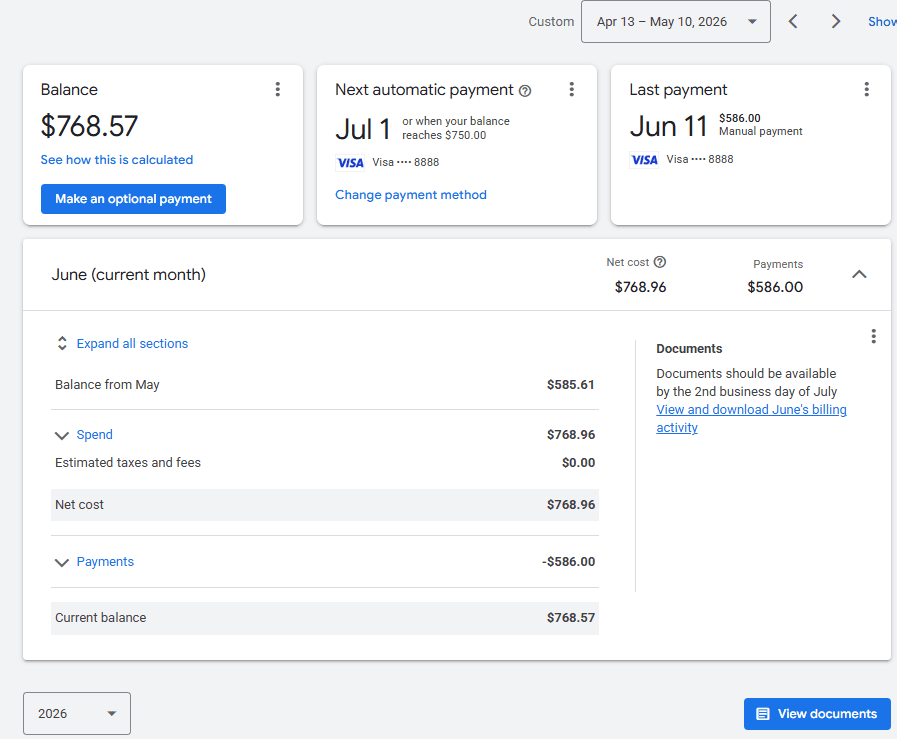
Use this map when you are not sure whether to open Google Ads or the Local Services Ads dashboard. For the broader platform comparison, read Google Ads vs Local Services Ads.
| Task | Start here | Why |
|---|---|---|
| Add or replace payment method | Google Ads billing | Google Ads owns the billing and payment method settings. |
| Update billing address or contacts | Google Ads billing | Payments profile details sit in Google Ads billing. |
| Check current LSA balance | Google Local Services Ads Reports | LSA reports show charged lead and spend context. |
| Review charged leads | Google Local Services Ads Reports | Lead status, calls, messages, and credits live with LSA leads. |
| Change weekly budget | Profile & Budget | Budget controls desired LSA spend and lead target planning. |
| Review invoices and payment documents | Google Ads billing | Billing documents come from Google Ads billing. |
| Fix a failed payment | Google Ads billing | The account needs a valid payment path before ads can serve. |
Automatic payments and payment thresholds
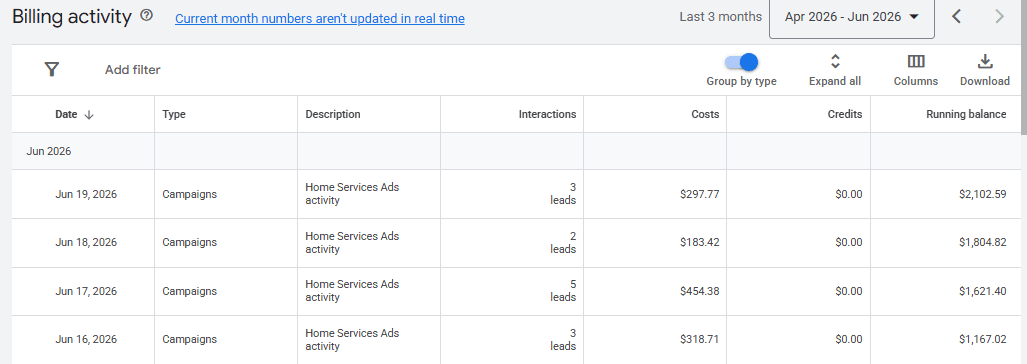
Many Local Services Ads accounts use automatic payments. Google charges the account when it reaches a payment threshold or when 30 days pass since the last automatic charge, whichever comes first.
That threshold can change as the account builds payment history. Check the Billing tab from the Local Services Ads lead inbox when you need the current threshold and balance context.
A charge does not mean the current week performed well. It can reflect prior lead charges, balance timing, a threshold, or the 30-day billing rule.
Budget controls spend, not the payment method
The average weekly budget helps Google estimate how many leads you want and how much you are willing to spend over time. For budget planning, use how much Google Local Services Ads cost and the Google LSA cost calculator.
Budget is not the same as billing. A valid card with a tiny budget can still limit lead flow. A larger budget with a failed payment method can still stop delivery.
| If you change | Likely effect | Review next |
|---|---|---|
| Payment method | Keeps the account billable if the method works. | Past-due balance, card status, payments profile access. |
| Average weekly budget | Changes spend room and lead target planning. | Monthly max, lead volume, CPL, booked-job cost. |
| Bid mode or target CPL | Changes how Google can compete for leads. | Lead volume, lead quality, market price, budget support. |
| Service area or job categories | Changes where and what the account can receive. | Lead fit, spend pace, missed opportunities. |
Reconcile charges, leads, and credits before judging the bill
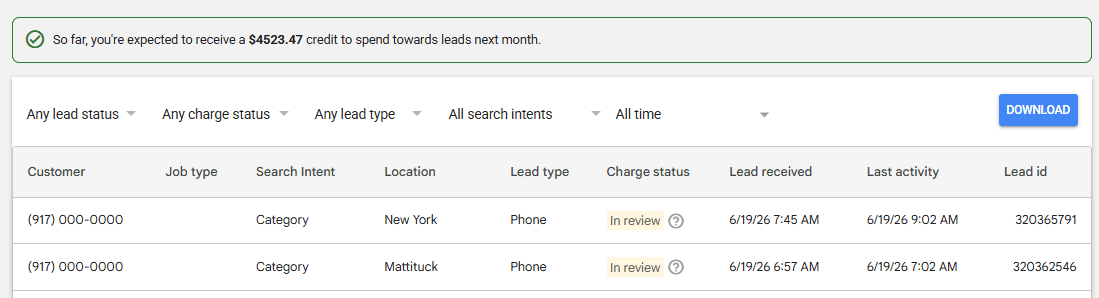
Do not judge the bill from the total charge alone. Reconcile the charge against leads, lead statuses, credits, and booked outcomes. Start with Google's automated LSA lead credits if credited leads are part of the question.
If the lead quality problem keeps showing up, review Google LSA lead feedback and the lead feedback review service before increasing budget.
| Review item | Where to look | Why it matters |
|---|---|---|
| Charged leads | LSA lead inbox | Shows which leads created cost. |
| Not charged leads | LSA lead status | Shows leads Google did not bill. |
| Credited leads | Billing and lead status | Shows charges Google later credited. |
| Original invoices | Google Ads billing | Shows payment documents and charge timing. |
| Booked jobs | CRM, call notes, intake notes | Shows whether the spend produced revenue. |
| Missed calls | LSA calls and phone system | Shows spend lost through response issues. |
| Message reply speed | LSA messages and inbox process | Shows whether leads stalled after contact. |
Billing interruption checklist
When Local Services Ads stop serving, billing is one of the first areas to check. Keep the review narrow before changing bids or rebuilding the account.
| Check | Question to answer | Where |
|---|---|---|
| Payment method | Is the card, bank account, or payment method valid? | Google Ads billing |
| Past-due balance | Does the account owe a balance? | Google Ads billing |
| Payments profile | Is the payer, tax, and contact setup correct? | Google Ads billing |
| Account status | Is there a Google Ads suspension or billing alert? | Google Ads and LSA |
| Budget remaining | Has the account spent through the available budget? | Profile & Budget |
| Verification | Did a verification or profile issue appear at the same time? | Local Services Ads dashboard |
| Recent edits | Did someone change budget, service area, hours, or category? | LSA change history and account notes |
Agency and client billing handoff checklist
Agencies and multi-location teams should clarify payment ownership before they change anything. Billing access problems can slow down launch, block fixes, or create client confusion when invoices arrive.
| Handoff item | Confirm before launch or takeover |
|---|---|
| Payments profile owner | Who is legally responsible for the account charges? |
| Payment method | Which card, bank account, or billing path should Google use? |
| Billing contact | Who receives payment emails and documents? |
| Invoice access | Who can download invoices and payment records? |
| Budget authority | Who can approve weekly budget changes? |
| Lead-credit review | Who reviews charged, credited, and not charged leads? |
| Escalation path | Who handles failed payment, past-due balance, or account suspension alerts? |
How Advantage fits into billing review
Advantage by PrimeLSA helps teams review the account context around billing questions: lead volume, cost movement, calls, messages, responsiveness, lead quality, budget context, and account health.
If the symptom is cost movement, start with LSA cost per lead increased. If lead flow stopped after a billing or account issue, use Google LSA leads suddenly stopped.
It does not change payment settings or budgets, submit lead feedback, send messages, or edit account settings for you. It helps you see what to review before you spend more, lower the budget, or assume billing explains the whole problem.
Final takeaways
Pay for Google Local Services Ads by setting up billing through Google Ads. Then manage desired spend through Local Services Ads budget settings and review actual charges through the lead inbox and billing view.
Keep the three layers separate: payment method, budget, and charged leads. That separation makes billing issues easier to fix and performance questions easier to answer.
Before you raise budget or change bids, reconcile charged leads, credited leads, lead quality, missed calls, message replies, and booked jobs.
Editorial note
Written by Arthur Z and last updated July 31, 2026. PrimeLSA keeps public guidance practical, Google Local Services Ads-specific, and connected to real account review.