
Quick answer
LSA bidding affects lead flow, but it does not explain every lead drop.
Google Local Services Ads use pay-per-lead bidding modes such as Maximize Leads, Target cost per lead, and Max per lead. Your bid and budget can affect visibility and lead targets, but Google also considers responsiveness, reviews, profile quality, relevance, and account status. Review those areas before changing bids.
What this covers
- Bid modesCompare Maximize Leads, Target CPL, and Max per lead without treating LSAs like standard keyword bidding.
- Budget and lead targetsConnect weekly budget, lead volume goals, target CPL, and monthly caps before judging a bid strategy.
- Account diagnosisCheck visibility, responsiveness, reviews, calls, messages, and account health before assuming the bid is the bottleneck.
What to review before acting
Google Local Services Ads bidding controls how much you are willing to pay for a lead and how Google can use your budget to compete in the local auction.
If your LSA leads slowed down, cost per lead rose, or your profile stopped showing in a market, review the full account picture before you change bid mode.
5K client calls generated
PrimeLSA has helped generate thousands of Local Services Ads calls for client accounts.
Transparent account communication
Clear communication and account review help teams understand what changed before they act.
Advantage review path
Readers can move from public education into account-specific review through Advantage.
How Local Services Ads bidding is different from standard Google Ads bidding
Local Services Ads are not standard pay-per-click search campaigns. A standard Google Ads search campaign often starts with keywords, ads, landing pages, and click costs. Local Services Ads focus on verified local service providers and charge for valid leads. Use the Google LSA cost per lead guide when you need the pay-per-lead model before comparing bid modes.
That difference changes the bidding question. In Local Services Ads, the useful question is how much the business can pay for a valid lead and what needs to happen after that lead arrives. The Google Local Services Ads cost calculator is the planning step before account-specific bidding review.
Local Services Ads bidding modes compared
Google lists three main bidding modes for Local Services Ads: Maximize Leads, Target cost per lead, and Max per lead.
Starting September 2024, Google places optional target fields under Maximize Leads bid strategies. Maximize Leads without targets remains Google's top recommendation for optimal performance.
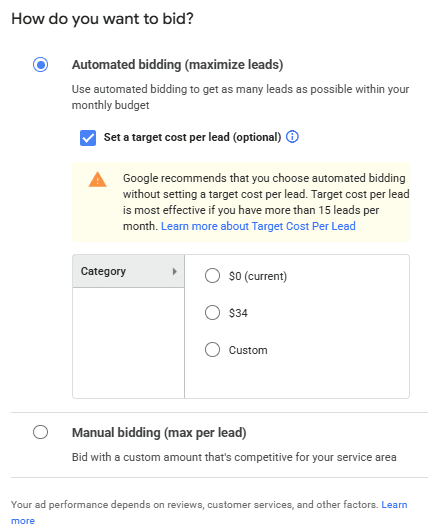
In the Local Services Ads interface, these appear as Automated bidding (maximize leads) and Manual bidding (max per lead).
| Bid mode | What it means | Best fit | Main risk |
|---|---|---|---|
| Maximize Leads | Google sets bids to get more leads for your budget. | You want more lead volume and can monitor lead quality. | Spend can move toward volume before you know which leads book. |
| Target cost per lead | An optional target under automated bidding that aims toward an average CPL. | You have enough lead history to set a realistic average target. | A tight or guessed target can restrict lead volume. |
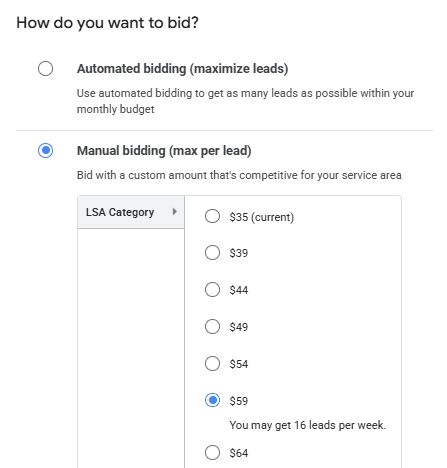
| Max per lead | You set a manual bid limit for a lead in the service area. | You need a hard cap or have a clear lead-value ceiling. | A low cap can reduce visibility and the estimated weekly lead range. |
How each LSA bid mode works
Maximize Leads is Google's recommended automated bidding mode for Local Services Ads. Google says Maximize Leads without optional targets remains its top recommendation for optimal performance.
Target cost per lead lets you set an average cost-per-lead target under automated bidding. Google uses campaign history and auction-time context to adjust bids toward that target. Some leads may cost more than the target and some may cost less while the system works toward the average. The LSA interface notes that Target CPL is most effective when the account has more than 15 leads per month.
Max per lead lets you set a manual cap. The interface can show estimated weekly leads for different manual bid amounts. Watch impressions and lead volume after you set the cap because a number that feels responsible on paper can starve the account if the market is more expensive than your limit.
Google also says it can take about two weeks to see more accurate results while the model adjusts and learns about the business.
Where to change Local Services Ads bid settings
Bid settings live in the Local Services lead inbox under Profile & Budget. Open the top menu, choose Profile & Budget, edit the Budget section, choose the bid setting, set the budget, and save.
If you choose Maximize Leads, Google may show optional Target CPL fields. You can use Google's recommended target or set your own, but the target should match real lead economics and monthly lead goals.
If you choose Manual bidding, the interface can show different max-per-lead choices and estimated weekly lead ranges. Use those estimates as planning context, not a guarantee.
| Step | What to do | Review note |
|---|---|---|
| 1 | Sign in to the Local Services lead inbox. | Confirm you are in the correct account and business. |
| 2 | Open the top menu and choose Profile & Budget. | This is where budget and bid settings live. |
| 3 | Edit the Budget section. | Review current weekly budget before changing bid mode. |
| 4 | Choose the bid setting. | Maximize Leads can include optional Target CPL fields. |
| 5 | Set the budget and save. | Budget should support the target monthly lead volume. |
Bidding affects ranking, but ranking also depends on profile quality
Google says Local Services Ads rank through an auction that considers bid and profile quality. A bid can help you compete, but it does not stand alone. Use how to rank higher on Google Local Services for the broader visibility foundation around reviews, response, relevance, and profile quality.
Public ranking factors from Google include responsiveness to customer inquiries, missed calls, search context, service relevance, business bio, rating, reviews, average response time, images, and completed verification checks.
That is why a bid change can fail to fix a lead-flow problem. If calls go unanswered, messages sit too long, reviews slow down, or the service area no longer matches demand, the bid may be one part of a larger account issue.
Weekly budget, lead targets, and monthly caps
Google asks advertisers to set an average weekly budget based on the number of leads they want in a given week. Google also says weekly lead targets depend on bid mode and weekly budget. For broader cost planning, review how much Google Local Services Ads cost. For the payment setup side, use how to pay for Google Local Services Ads.
If you use Maximize Leads, Google recommends enough budget to support roughly 10 leads per week for optimal results. Treat that as a planning reference, then compare it with real lead quality and booked-job economics.
Use this planning formula: target weekly leads multiplied by expected cost per lead equals starting weekly budget.
| Target weekly leads | Planning CPL | Starting weekly budget |
|---|---|---|
| 5 leads | $40 | $200 |
| 10 leads | $40 | $400 |
| 15 leads | $40 | $600 |
| 10 leads | $75 | $750 |
| 20 leads | $75 | $1,500 |
Lead price is not the same as booked-job cost
The lead price tells you what Google charged for a valid lead. It does not tell you whether the lead booked, whether the customer fit your service area, or whether the call turned into revenue. If booked jobs are the issue, use the guide on improving Google LSA conversion rates before treating bidding as the only lever.
| Metric | What it tells you | Why it matters |
|---|---|---|
| Charged lead price | What Google charged for a valid LSA lead. | Useful for budget and bidding review. |
| Qualified lead cost | Spend divided by leads that fit your service and market. | Shows whether the lead type matches the business. |
| Booked-job cost | Spend divided by booked jobs. | Shows intake and sales performance. |
| Revenue per booked job | Revenue from work that came from LSA leads. | Shows whether the bid strategy supports profit. |
Check these signals before changing your bid
When leads drop, many advertisers raise bids first. That can help in some cases. It can also hide the real problem. If your symptom is cost movement, start with LSA cost per lead increased. If visibility fell, compare against LSA impressions dropped before changing bid strategy.
| Symptom | What to check before changing bids |
|---|---|
| Leads dropped | Budget spent, ad status, service area, profile status, review movement, missed calls, message response. |
| Impressions dropped | Account status, targeting, business hours, ad schedule, verification, service area, market demand. |
| Cost per lead increased | Lead type mix, market competition, budget posture, call answer rate, message reply speed, valid vs poor-fit leads. |
| Calls increased but booked jobs did not | Call quality, intake script, missed callbacks, service fit, quote follow-up. |
| Message leads slowed down | Reply timing, auto-reply coverage, business hours, message lead settings. |
| Ranking varies by city | Service-area fit, local competition, profile relevance, review strength by market. |
| Budget runs out early | Weekly budget, monthly max, lead targets, lead type mix, bidding mode. |
Which bidding mode should you choose?
Use this decision matrix as a starting point. No single bid mode fits every account. Keep the bid decision tied to account conditions and business capacity.
| Business situation | Bid mode to consider | Monitor after the change |
|---|---|---|
| New account with little lead history | Maximize Leads | Lead volume, lead quality, spend pace, missed calls, message replies. |
| Stable account with enough lead history | Target CPL | Average CPL, lead volume, impression movement, booked-job cost. |
| Market is expensive and lead value has a hard ceiling | Max per lead | Impression volume, lead volume, cost control, lost opportunity. |
| Leads stopped after a recent change | Do not switch modes first | Change history, budget, status, service area, reviews, calls, replies. |
| High lead volume but poor booking rate | Keep bid mode stable during intake review | Call quality, qualification, follow-up, lead feedback, and poor-fit leads. |
| Agency managing several accounts | Use account-specific mode choices | Client capacity, category, market, response process, budget limits. |
Why leads can drop after a bid change
Lead volume can change after a bid update because the bid mode needs time to adjust, a Target CPL or Max per lead setting may restrict auction participation, or the budget may not support the lead target.
Market demand, competitor activity, responsiveness, reviews, profile quality, account status, billing, verification, targeting, and schedule settings can move at the same time. Use Google LSA leads suddenly stopped when the problem is a sharper lead-flow drop.
Google says it can take about two weeks to see more accurate results as the model adjusts. Do not judge a bid change from one slow day. Compare before and after periods, then review calls, messages, lead types, and account status before making another change.
How Advantage fits into bidding review
Bidding review works better when you can see the account context around the bid.
Advantage by PrimeLSA helps teams review visibility movement, lead volume changes, call handling, missed calls, message reply speed, lead quality, reviews, budget context, service-area context, and account health. For call-specific review, use Google LSA call analysis. For message speed, use Google LSA auto reply.
The product supports the decision. It does not replace the operator, change bids or budgets, submit lead feedback, send messages, or edit account settings for you.
Bidding review checklist
Before you change bid mode, collect the current bid mode, weekly budget, target CPL, max per lead, monthly spend pace, lead count by type, valid leads, credited leads, poor-fit leads, missed calls, returned calls, message reply time, booked jobs, reviews, service-area changes, account alerts, and profile edits.
This list gives the review enough context to decide whether the bid is the issue or the account needs a different fix.
Final takeaways
Local Services Ads bidding controls how your account competes for leads, but bidding does not operate in isolation. Google considers bid, budget, profile quality, responsiveness, reviews, relevance, and account conditions.
Use Maximize Leads when you want volume and can monitor quality. Use Target CPL only when you have enough history to set a realistic average lead-cost target. Use Max per lead when you need a hard cap and can accept lower volume if the cap is too tight.
Before you change bids, review the account. Check calls, messages, reviews, lead quality, budget, service area, and account health.
Editorial note
Written by Arthur Z and last updated June 18, 2026. PrimeLSA keeps public guidance practical, Google Local Services Ads-specific, and connected to real account review.