

Quick answer
Google can turn website copy into LSA callouts
Google LSA website content can become automated callouts. Google documents Asset optimization for pay-per-lead campaigns with a linked website. PrimeLSA also found a website-matching callout for 702 Roofing even though its LSA profile had no website attached. A linked LSA website helps establish the source, but our evidence shows it is not required.
- The feature is documentedGoogle now documents Asset optimization for pay-per-lead campaigns: it can scan a linked business website and generate assets such as automated callouts.
- The wording can changeLive ads show direct excerpts, compressed claims, and rewritten combinations drawn from nearby website text across legal, roofing, and HVAC results.
- A linked LSA website is not requiredPrimeLSA's profile data showed no LSA website attached to 702 Roofing. Google still served a callout that matched indexed text on the roofing company's website.
Observed website-to-ad patterns
Three ways website language surfaced in live LSA results
The examples below connect words shown in live local ads with public website language. They demonstrate extraction and rewriting behavior, not a ranking formula or a guarantee that Google will select a particular statement.
Direct extraction
A case result, offer, service, or trust statement appears with the same wording as the source page.
Compressed wording
Google shortens a longer website heading into a compact callout that fits the local ad result.
Adjacent-text rewrite
Google combines adjacent labels and values, which can create wording the business did not write as one sentence.
What Google has confirmed about website-generated callouts
Google now describes the mechanism in official documentation. According to Google's pay-per-lead asset documentation, Asset optimization can scan a linked business website and generate ad assets, including automated callouts, for Performance Max campaigns with pay-per-lead goals. Google also says the advertiser can edit the website URL, turn off Asset optimization, or remove the URL.
Google can use website copy beyond the standard LSA highlights an advertiser selects. It may condense a settlement amount, price, award, guarantee, specialty, or trust statement into the short line beneath the business name.
Account state changes the available controls. Google's Google's legacy LSA editing guide still says that adding or updating a website in the legacy Local Services Ads workflow requires support. Google's Google's LSA migration guide says migrated pay-per-lead campaigns are managed in Google Ads, where callouts and other assets have more direct controls. Advertisers should identify which workflow they have before looking for a setting that may not exist in their interface.
Google's documentation describes Asset optimization with a linked business website. PrimeLSA's field evidence shows a wider callout layer: Google served callouts to profiles with no LSA website attached, and one of those callouts matched indexed website content. Google has not documented that source path or provided a separate control for it.
Live examples with a visible website connection
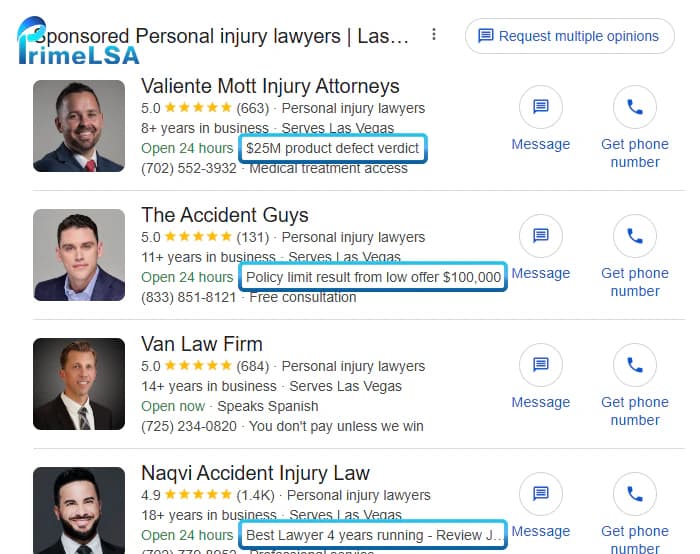
PrimeLSA reviewed live local ad results and compared the callout text with the businesses' public pages. Four legal advertisers showed the clearest website-to-ad connection.
For The Accident Guys, the ad showed versions of “Persistent injury case result $150,000” and “Policy limit result from low offer $100,000.” On The Accident Guys website, those values sit beside the longer case labels “Significant Persistent Injuries from Accident” and “Rear End Low Ball Offer to Policy Limits.” The ad compressed nearby title-and-value pairs into short claims.
Valiente Mott's ad displayed “$25M product defect verdict.” A results section near the top of Valiente Mott's homepage pairs “$25M” with “Product Defect - Wrongful Death.” The number and subject match, while the ad changes the outcome label to “verdict.”
Naqvi Injury Law displayed “Best Lawyer 4 years running.” The source language on Naqvi Injury Law's homepage reads “Best Lawyer Four Years Running - Review Journal.” Pacific West Injury Law displayed “Dog bite settlement $300,000,” matching the prominent case-win text on Pacific West Injury Law's LSA landing page. These examples show that source placement can range from a homepage hero-area section to a dedicated LSA landing page.
| Advertiser | Observed ad callout | Matching website language | Pattern |
|---|---|---|---|
| The Accident Guys | Persistent injury case result $150,000 | Significant Persistent Injuries from Accident + $150,000 | Adjacent-text rewrite |
| Valiente Mott | $25M product defect verdict | $25M + Product Defect - Wrongful Death | Compression and rewrite |
| Naqvi Injury Law | Best Lawyer 4 years running | Best Lawyer Four Years Running - Review Journal | Compressed wording |
| Pacific West Injury Law | Dog bite settlement $300,000 | Dog Bite Settlement $300,000 | Near-direct extraction |
Callouts appeared with no website linked to the LSA profile
PrimeLSA's direct profile data showed no website attached to the 702 Roofing LSA profile. Google still served “Trusted by Fortune 500 companies,” a callout that matched language on the company's public website.
A 702 Roofing result showed “Trusted by Fortune 500 companies,” while 702 Roofing's website says Fortune 500 companies and the U.S. government have trusted the company with their roofs. Another result used “Award winning roofing contractor,” language that also appears in the site's HTML title element and organic search title. That match does not identify the title element as the sole source, but it makes page titles part of the callout audit. A Service Champions result showed “Residential drain cleaning for $47,” matching the service name and current price on Service Champions' drain-clearing page.
The 702 Roofing result proves that a missing LSA website field does not prevent Google from connecting an advertiser with indexed web content. The response does not label the source, so it cannot tell us whether Google used its search index, business-entity data, an older record, or another source.
Service Champions also showed no website link in the LSA or Business Profile views we checked. Its ad displayed “Residential drain cleaning for $47,” matching the service name and price on a deeper page. The 702 Roofing and Service Champions examples show that indexed website language can enter the callout pool without a website linked to the LSA profile.
| Business | Website connection | Observed callout |
|---|---|---|
| 702 Roofing | No website attached to LSA | Trusted by Fortune 500 companies |
| Service Champions | No website linked in observed LSA or Business Profile | Residential drain cleaning for $47 |
Google can quote source copy or rewrite adjacent text
The observed callouts did not always reproduce a complete sentence. Google shortened headings, removed source attribution, normalized numbers, and combined labels with values. That can make an accurate source section sound broader in the ad.
The examples suggest that placement helps Google connect text elements, but they do not support a formula such as “put a number beneath the hero and Google will use it.” The selected line changed across repeated searches. Treat the output as dynamic creative rather than a stable field.
A strong source block should make sense when reduced to one short line. Put the subject, amount, condition, geography, and relevant date close together. Avoid layouts where a carousel, animation, or separated column can make one value appear to belong to the wrong label when the DOM presents the HTML in another sequence.
Is this AEO for Local Services Ads? Similar idea, different system
There is a useful similarity to answer engine optimization: Google reads a page, interprets a claim, and presents a shortened answer on a surface it controls. The same content hygiene helps both systems: clear HTML, current facts, descriptive headings, consistent entities, and claims that remain accurate outside their original layout.
Google calls the LSA mechanism Asset optimization. AEO and GEO refer to visibility in generative search experiences. In Google Search's AI optimization guide, Google says optimizing for its generative search features remains SEO and warns against special AI-only rewrites and unsupported hacks. There is no public evidence that an LSA callout uses the same retrieval or ranking process as an AI Overview.
A useful working label is “website-to-ad optimization.” Build accurate source content that works for customers, ordinary search, and automated ad extraction. Do not create a hidden page or awkward block of machine-targeted phrases to influence one callout.
Audit the website as a potential ad asset library
Start with a source inventory. Review the homepage, location pages, service pages, offer pages, results pages, title tags, headings, visible cards, image alternative text, and older pages that still resolve. Search for currency symbols, percentages, superlatives, guarantees, awards, review claims, time limits, and words such as free, best, lowest, certified, emergency, settlement, verdict, warranty, and discount.
For every claim, record its owner, evidence, effective date, expiration date, conditions, source URL, and the exact approved wording. Remove or revise anything the business cannot support today. Offers should state the service, price, location or eligibility conditions, and expiration in the same readable section. Legal results should include the context and disclaimer required by the firm's jurisdiction and counsel.
Read the page in document order alongside the visual design. Automated systems can encounter text in a different sequence from the desktop layout. A price in one element and a service name several containers away may still be interpreted together. Sliders and repeated card grids raise that risk.
- Keep one claim and its qualifying context in the same semantic section.
- Use visible HTML for important wording instead of placing the copy inside an image.
- Write headings that identify the service or result without relying on neighboring artwork.
- Remove expired offers and stale award claims from indexable pages.
- Align the website, Business Profile, Google Ads account, and LSA details where the same field appears.
- Save dated screenshots of the source page and observed ad before making changes.
Make source content easier for Google to retrieve and interpret
If you attach a website to a migrated pay-per-lead campaign, verify the URL in Google Ads and confirm that Asset optimization is enabled when the business wants generated assets. In a legacy LSA account, ask support to verify or update the website. Keep the same current domain in the Google Business Profile and other business records.
Audit the public website even when no website is attached to LSA. The 702 Roofing profile had an empty website field, yet Google served a callout that matched indexed website copy. Check the homepage, page titles, service pages, offer pages, and older URLs that still load.
Serve important claims as visible, server-rendered HTML on a public URL that returns a successful response. Keep the page out of login walls, broken consent gates, and interactions that hide copy until a visitor opens a slider. Link important service, offer, award, and result pages from crawlable site navigation or relevant internal pages.
Treat the HTML title element as candidate source text. The 702 Roofing example matched “Award winning roofing contractor” in the site's title and search result. We cannot prove that the title supplied the callout, so keep the title accurate, unique, and consistent with the visible H1. Do not place an unsupported award, expired price, or broad guarantee in metadata.
Use LocalBusiness, Service, or Offer structured data when it describes visible page content and meets Google's rules. Google has not documented a special schema type for automated LSA callouts. Schema can clarify entities and offers, but it cannot force Google to create or display a callout.
How to adjust Google automated callouts: Google does not provide a field for choosing the exact generated line, but businesses can influence the source material available to Google. Use the checks below whether the LSA profile has a website attached or not.
| Check | What to do | Why |
|---|---|---|
| Website connection | If a website is attached to LSA, confirm that Google Ads, your Google Business Profile, and the LSA profile use the same current domain. If no website is attached, audit the public website anyway. | 702 Roofing received a web-matching callout with no website attached to LSA. |
| Page opens without extra steps | Open the page in a private browser window. The key text should load on the page without a login, form submission, or slider click. | Google may miss text that appears only after someone clicks. |
| Claim and details stay together | Put the service or case type, amount, conditions, and date in the same text block. | Google can combine nearby text. Separated details can produce a misleading callout. |
| Page title and main heading | Use the same plain description of the service in the browser title and the visible page heading. Remove claims you cannot prove. | Google may shorten either line when it creates a callout. |
| Links to the page | Link the page from the related service or location page, then include it in your sitemap. | Google can find the page and check it again after an update. |
| Old offers and claims | Remove expired prices, outdated awards, and guarantees you no longer honor. | Old wording can return as current ad copy. |
Structure claims so they remain accurate when shortened
The safest source pattern places a short claim beside its context. For a home-service offer, use a heading such as “Residential drain clearing,” then show the current price and the conditions that control it. For an award, name the awarding organization and year. For a case result, keep the amount, matter type, outcome type, jurisdictional disclaimer, and result-variability language together.
Do not manufacture claims to chase callout space. A statement should earn its place on the website because it helps a prospective customer understand the business. The page should read well and stay accurate even when Google does not turn the statement into an ad asset.
Offers and prices
Service name, price, eligibility, expiration, and any material limitation should remain understandable when read together.
Awards and trust claims
State the award name, awarding organization, applicable year, and scope instead of using an unsupported “best” claim.
Legal case results
Keep the amount beside the matter type and outcome, then add counsel-approved result disclaimers where required.
Guarantees and warranties
Describe the covered service and meaningful exclusions. Avoid absolute language when the warranty has conditions.
Automated extraction raises the cost of weak claims
Automated selection does not transfer responsibility away from the advertiser. A stale price, unsupported superlative, expired award, or result without sufficient context can become more visible when it appears in an ad. Review every candidate statement against the Google Ads misrepresentation policy and the rules that apply to the business category and jurisdiction.
Law firms need particular care. A prior result may require specific disclaimers and cannot imply that a future client will receive the same outcome. Home-service businesses should verify price conditions, financing language, warranty scope, licenses, and geographic limits. Agencies should obtain written approval for source claims and preserve the approved version.
Do not wait for a complaint. The source audit should happen before enabling Asset optimization, after a redesign, whenever promotions change, and when a callout appears that the business does not recognize.
Monitor the live ad and the source page
Callouts can rotate, disappear, or change wording. Review the business's important services, cities, devices, and times of day. Record the query, market, date, advertiser position, visible callout, website button status, candidate source URL, and a screenshot.
Compare the observed line with the source page word for word. Classify it as a direct extraction, compression, adjacent-text rewrite, unknown source, standard profile highlight, or advertiser-managed callout. That classification prevents a manual asset from being mistaken for automated website content.
After a source-page edit or account change, keep both the before and after evidence. Google does not promise immediate replacement of a generated asset, and the ad may continue rotating older or different content during the review window.
| Review field | Why it matters | Evidence to keep |
|---|---|---|
| Observed callout | Captures Google's actual wording | Screenshot and exact text |
| Visible website status | Separates public presentation from account assumptions | Ad detail and profile view |
| Candidate source | Connects the callout with current page language | URL and page screenshot |
| Extraction type | Distinguishes quotes from rewrites | Direct, compressed, combined, or unknown |
| Available control | Separates the linked-site setting from the unlinked-profile case | Asset optimization setting, support case, or no separate control documented |
| Follow-up date | Accounts for rotation and processing delay | Repeated checks over time |
Use the control that matches the account's migration state
For a migrated pay-per-lead campaign, review the website URL and Asset optimization setting in Google Ads. Label advertiser-managed callouts so the team knows which wording it controls. Google's current documentation allows up to six callouts per category and distinguishes them from generated assets.
For an account still managed in the legacy Local Services Ads dashboard, check the profile and existing website association. Google's legacy LSA editing guide says a website addition or update requires support. Keep the support case, requested URL, and date so later ad reviews use the correct source history.
If a linked-site callout is wrong, fix the source content and use the Asset optimization control available in the account. If no website is attached to LSA, Google has not documented a separate off switch. Fix the public source, save the evidence, contact support, and monitor the result. Avoid changes to budget, service areas, or bidding unless separate evidence supports them.
Treat website content as part of the LSA ad review
Google has confirmed the linked-website Asset optimization feature. PrimeLSA's live profile data also shows that the broader callout layer works without a website attached to the LSA profile. The 702 Roofing callout matched indexed website language despite an empty LSA website field.
Start with a claim audit and a monitoring routine. Make each important statement accurate in isolation, verify account-level website associations, identify whether Asset optimization is enabled, and keep evidence of what Google displays. The record gives the business a response when the callout helps, misstates, or surprises.
Editorial note
Written by Arthur Z and last updated September 22, 2026. PrimeLSA keeps public guidance practical, Google Local Services Ads-specific, and connected to real account review.